Hi, this is /slant moved from rentry O_O so everything up until question 20 is referring to fluffle as rentry, srry !! o and also 4 some reason the metadata isnt completely working... mb ill fix it soon
 This is a rentry meant for assisting with Metadata and sharing some tricks used in making rentries, and also has additional information mainly for beginners. Have fun
Table of Questions (get it?)
How do I upload images you made? How do I create a Rentry page such as this, where the text is above the image? How do I create a gradient in text? People have moving text on their rentries! How do they make these text move? I want to get into making rentries, but I'm afraid of losing the progress because I'm on mobile... What are some good resources for Rentry? What information should I put on my (personal) Rentry? How do borders work? What are pixels for? How do I recolor them? What are dividers for? How do I make stamps like on Tumblr or Rentry? I don't know what I should theme my Rentry around... What are graphics, and how do you make them? How do I find the frames for the character? How are some animated? What if the animated part goes inside the frame? What if I want a Rentry with a specific color scheme, but the character/theme doesn't fit the color scheme in the slightest? I've created a graphic, but it feels empty. What are charms, and how do you use them?
It's actually quite easy! There are numerous places you can upload and host images, such as Catbox, PostImages, and FileGarden! I personally use Catbox, but see what works best for you!
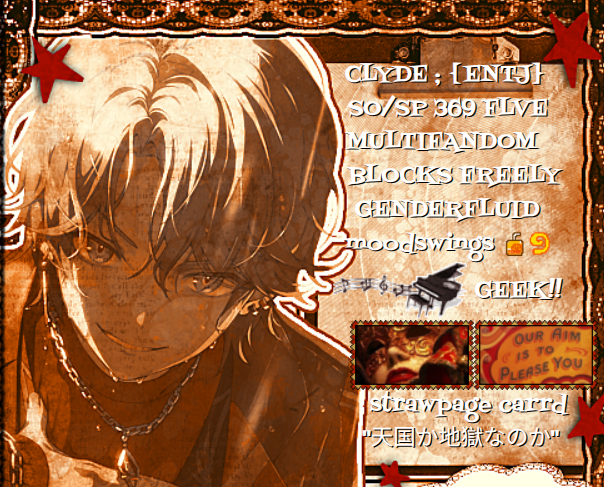
As a beginner may figure out when attempting to create a rentry with text above an image, it is... Impossible!
The secret to creating rentries such as this is to turn the image into the background! It is a messy process, so make sure your image are these two things:
- Small enough for a rentry
- Added with the Metadata "CONTAINER_INNER_BACKGROUND_IMAGE_REPEAT = no-repeat", just in case.
Now, you may wonder how some users get their text to be on the other side without using periods or spaces?
Its really simple! You upload a completely transparent image and resize it (preferably like 100:1 so no space is lost.)
Hopefully, this helps enough!
There is an easy way and a way that may be more time consuming but allows YOU to control how the gradient works.
One is to use this site to generate the gradient.
One is to create it yourself. Colored text, minus the spaces of course, uses " color text ", which makes gradiented text a bit cluttered, but worth it! <3
People with moving text on their rentries insert a piece of HTML that creates a marquee! There should be pastebins with the code for these marquees, and marquee generators! However, do be aware they take up a HUGE amount of space inside the code, and are an obsolete HTML tag...
Back up your code all the time, write down your edit code, and start simple! It is true making rentries on mobile is incredibly hard (mostly due to the nature of rentry images requiring the URL), but if you want a personal website and are scared of losing your progress on rentry, there are still ways you can make a personal website! Strawpage, Carrd, and Lurk come to mind first for personal websites friendly for mobile.
I personally believe rentry.co/border is an amazing resource! Some other good ones are on my carrd, which also has Metadata fonts for Rentry! Remember that many rentry resource websites link to even MORE resource websites, so finding them are pretty easy. !>Remember to credit any resources you find when necessary using the alt tag, which is the brackets in the image!
I'm glad you asked! I have a list of information typically put on Rentry, starting from most important to least important! (WIP)
- Name
- Other names if necessary
- Pronouns and gender
- Boundaries
- Do these shortly, and if you make an extended rentry page, explain further on it
- If you feel comfortable with it, any medical problems
- I personally am a bit iffy with doing this, but it can be useful for many!
- MBTI/Enneagram/Typology
- Your typology is not required, just useful!
- PLEASE, if you add your MBTI or Enneagram and whatnot, don't use a test to get it! Tests are inaccurate, try studying the theory! <3
- Your typology is not required, just useful!
- Fandoms
- Not required. You can add the ones you're most involved in or add them all in an extended rentry page.
- Hobbies / Passions
- And more! Anything legal can be on a rentry :)
Hah.. ha.. Long story short, experiment a ton with them. I personally barely know how they work. If you want a quick border, rentry.co/up has premade borders that look super nice (I used to use one for this page!), but borders in general are just experimenting with the parameters to get the best looking border possible!
For what some border metadata does so you can experiment more efficiently, there should be tutorials out there if you search them up! <3
If it helps, the border width is how large it is, the border outset is how far out it is from the main page, and the border repeat is how it repeats (Wow, thats such a useful hint..)
For Border Repeat, typically round and repeat are your best bets. I'm not so sure about space and stretch, but they probably have their uses.
Border Slice is also very important, it determines how the border is cut up. Despite this importance, its better to experiment with it, due to how it works!
Apologies for how bad this explanation is. The "How" part next to the Metadata in Rentry should be more useful than this!
They are used to decorate your rentry, and in the case of some pixels, showcase your interests/identity!
Go to Ezgif, put your desired gif for recoloring, and upload it!
They are used for dividing up parts, although you can also download them, recolor them, photobash them with other dividers, and use them for Rentries where the text is above the main image, which is a background! <3
Find a stamp template and use Ezgif to put the desired image/gif into the stamp. Remember that most stamps are 99 x 56px!
That's completely normal. Most rentries are themed after characters, so try theming your rentry around a favorite character of yours! Some other rentries are themed after objects (not the OSC kind), but not usually. Some Rentries are also themed after ships! You can theme your rentry around anything, if you set your mind towards it! <3
Graphics are decorated images typically displaying the character that the Rentry is themed after.
Here is an example:

As can be seen, they are highly decorated, and sometimes even move! They may even seem too elaborate for some people to create...
But do not fret, for these kinds of graphics are actually quite easy to create if you have the right resources!
Many Rentry resources provide frames. You can download them and use them freely if they are listed as not requiring credits! Do know that sometimes these images have stray pixels. If you use IbisPaint X to create graphics, you'll have to clean up these pixels!
There are many methods, but from what I know, you import the final image (without the animated parts) and add the animated part above the final image.
Fill in the frame with a green color (or any color that contrasts the rest of the frame a lot) and use a chroma key effect to put the animated part inside!
(Hi, this is outdated and incorrect. Do not use a chromakey affect, just Photopea. I'm making a more indepth tutorial soon, I'll link it here when I'm done. <3)
There are two things you can do! On Pinterest, there tends to be coloring tutorials utilizing IbisPaint X's blending modes! Do know most art programs have blending modes, and you do not need IbisPaint X for these coloring tutorials.
Or, you can use a free gradient map creator online!
Usually, graphics feel empty because there aren't enough decorations. A graphic is not just a character and a frame! There are decorations, many of which you can find in Rentry resources under "photos" or "PNGs", to use in order to make your graphic feel complete!
Charms are images or gifs that are displayed under the page. They are used by appending #right or #left to the end of the image link! Make sure nothing is below the charm, though.
They tend to look like this:


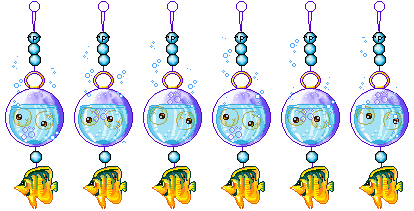
I have a charm at the end of the page, if you'd like to see how they look on a real page. (Unfortunately it doesnt seem like charms work on fluffle... My bad!!)